

问题描述
我在我的Windows电脑上安装了VMware,并虚拟出来3台虚拟机,分别用作gitlab、jenkins、builder,我的流水线是存到gitlab仓库的,所以在Jenkins流水线选择的是 Pipeline script from SCM,因此在执行每次构建的时候,Jenkins都会去gitlab拉取最新的变更执行构建任务,但是发现每次执行的时候都有一个 Declarative: Checkout SCM 阶段并且耗时很长,百思不得其解,于是开始进一步的排查。
Jenkins构建如下:
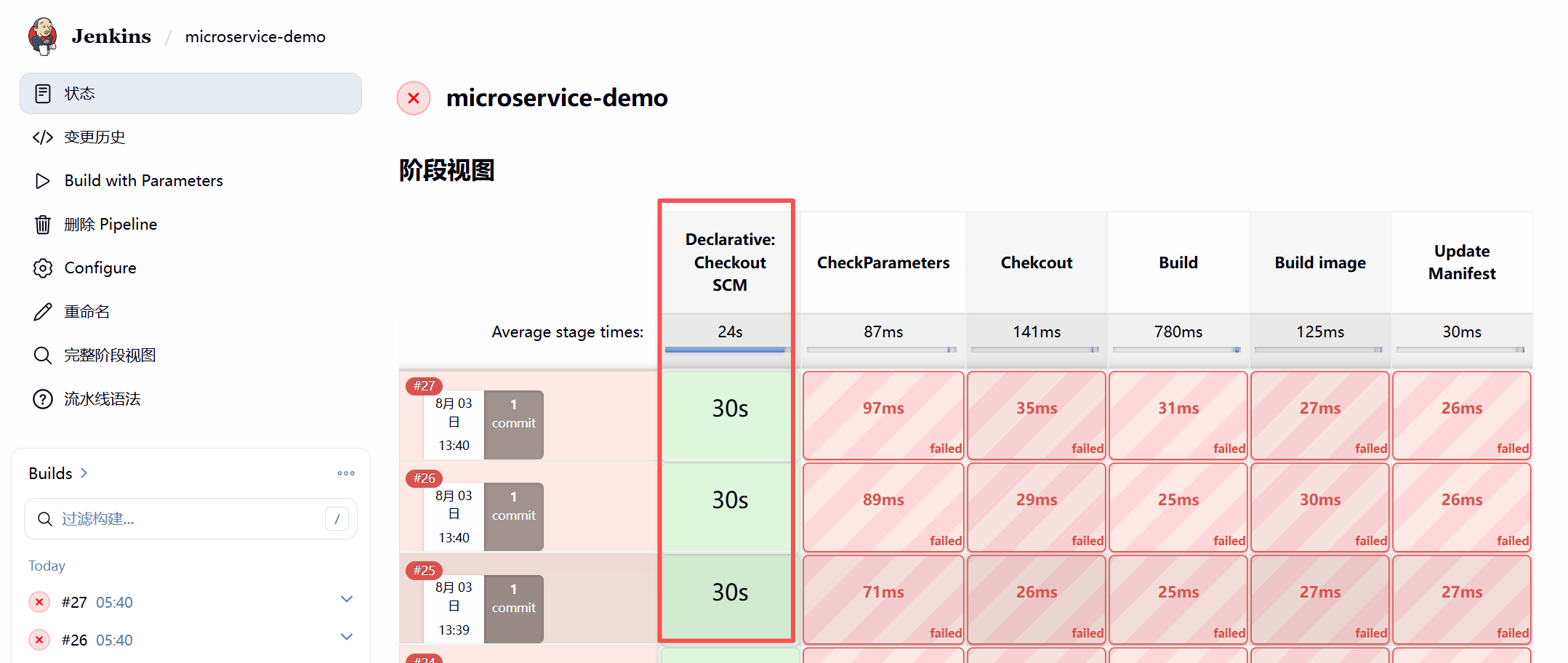
排查过程
由于执行是在builder这台虚拟机上执行的,所以首先到builder这台机器上进行排查。
在builder上手动执行 git clone, 可以看到耗时15秒,但是整个项目大小才200K,这相当的不正常。
# 手动克隆仓库
root@builder:/tmp# time git clone git@gitlab.chenxie.net:chenxie/devops-demo.git
Cloning into 'devops-demo'...
remote: Enumerating objects: 338, done.
remote: Counting objects: 100% (305/305), done.
remote: Compressing objects: 100% (263/263), done.
remote: Total 338 (delta 162), reused 0 (delta 0), pack-reused 33 (from 1)
Receiving objects: 100% (338/338), 28.50 KiB | 28.50 MiB/s, done.
Resolving deltas: 100% (170/170), done.

real    0m15.420s
user    0m0.067s
sys 0m0.030s

# 项目大小
root@builder:/tmp# du -sh devops-demo/
200K    devops-demo/
既然这台机器这么慢,那我直接上gitlab的机器上看看呢。
首先在gitlab的虚拟机上执行同样的 git clone 看看:
root@gitlab:/tmp# time git clone git@gitlab.chenxie.net:chenxie/devops-demo.git
Cloning into 'devops-demo'...
remote: Enumerating objects: 338, done.
remote: Counting objects: 100% (305/305), done.
remote: Compressing objects: 100% (263/263), done.
remote: Total 338 (delta 161), reused 0 (delta 0), pack-reused 33 (from 1)
Receiving objects: 100% (338/338), 28.58 KiB | 9.53 MiB/s, done.
Resolving deltas: 100% (169/169), done.

real    0m15.508s
user    0m0.062s
sys 0m0.043s
gitlab宿主机上依然15秒。
那再到gitlab的容器中试试呢:
root@gitlab:/tmp# docker exec -it gitlab bash
root@gitlab:/# cd /tmp/
root@gitlab:/tmp# time git clone git@gitlab.chenxie.net:chenxie/devops-demo.git
Cloning into 'devops-demo'...
remote: Enumerating objects: 338, done.
remote: Counting objects: 100% (305/305), done.
remote: Compressing objects: 100% (263/263), done.
remote: Total 338 (delta 162), reused 0 (delta 0), pack-reused 33 (from 1)
Receiving objects: 100% (338/338), done.
Resolving deltas: 100% (170/170), done.

real    0m0.348s
user    0m0.073s
sys 0m0.028s
哇,gitlab容器中居然不到1秒就完成了,太快了。
所以这是为什么呢?gitlab容器中很快,gitlab宿主机很慢,builder主机也很慢。
接下来使用 strace 追踪:
回到gitlab宿主机,然后执行以下命令,执行后会生成文件/tmp/git.trace:
# 安装trace软件包
apt install strace

# 执行命令:
root@gitlab:/tmp# strace -tt -T -o /tmp/git.trace git clone git@gitlab.chenxie.net:chenxie/devops-demo.git
Cloning into 'devops-demo'...
remote: Enumerating objects: 338, done.
remote: Counting objects: 100% (305/305), done.
remote: Compressing objects: 100% (263/263), done.
remote: Total 338 (delta 162), reused 0 (delta 0), pack-reused 33 (from 1)
Receiving objects: 100% (338/338), 28.50 KiB | 7.12 MiB/s, done.
Resolving deltas: 100% (170/170), done.

root@gitlab:/tmp# ll /tmp/git.trace
-rw-r--r-- 1 root root 180K 2026-08-03 16:55 /tmp/git.trace
追踪文件 /tmp/git.trace 已生成,来查看一下,我们重点看一下是哪个地方发生了耗时较长的情况:
16:55:03.099336 socket(AF_INET, SOCK_DGRAM|SOCK_CLOEXEC|SOCK_NONBLOCK, IPPROTO_IP) = 5 <0.000032>
16:55:03.099407 setsockopt(5, SOL_IP, IP_RECVERR, [1], 4) = 0 <0.000030>
16:55:03.099479 connect(5, {sa_family=AF_INET, sin_port=htons(53), sin_addr=inet_addr("127.0.0.53")}, 16) = 0 <0.000036>
16:55:03.099562 poll([{fd=5, events=POLLOUT}], 1, 0) = 1 ([{fd=5, revents=POLLOUT}]) <0.000054>
16:55:03.099668 sendmmsg(5, [{msg_hdr={msg_name=NULL, msg_namelen=0, msg_iov=[{iov_base="\350&\1 \0\1\0\0\0\0\0\1\6gitlab\vlocaldomain\0"..., iov_len=47}], msg_iovlen=1, msg_controllen=0, msg_flags=0}, msg_len=47}, {msg_hdr={msg_name=
NULL, msg_namelen=0, msg_iov=[{iov_base="\204(\1 \0\1\0\0\0\0\0\1\6gitlab\vlocaldomain\0"..., iov_len=47}], msg_iovlen=1, msg_controllen=0, msg_flags=0}, msg_len=47}], 2, MSG_NOSIGNAL) = 2 <0.000067>
16:55:03.099805 poll([{fd=5, events=POLLIN}], 1, 5000) = 1 ([{fd=5, revents=POLLIN}]) <0.001687>
16:55:03.101565 ioctl(5, FIONREAD, [122]) = 0 <0.000040>
16:55:03.101663 recvfrom(5, "\204(\201\203\0\1\0\0\0\1\0\1\6gitlab\vlocaldomain\0"..., 2048, 0, {sa_family=AF_INET, sin_port=htons(53), sin_addr=inet_addr("127.0.0.53")}, [28 => 16]) = 122 <0.000031>
16:55:03.101753 poll([{fd=5, events=POLLIN}], 1, 4997) = 0 (Timeout) <5.002151>
16:55:08.104017 poll([{fd=5, events=POLLOUT}], 1, 0) = 1 ([{fd=5, revents=POLLOUT}]) <0.000032>
16:55:08.104177 sendto(5, "\350&\1 \0\1\0\0\0\0\0\1\6gitlab\vlocaldomain\0"..., 47, MSG_NOSIGNAL, NULL, 0) = 47 <0.000136>
16:55:08.104451 poll([{fd=5, events=POLLIN}], 1, 5000) = 0 (Timeout) <5.005188>
16:55:13.109774 poll([{fd=5, events=POLLOUT}], 1, 0) = 1 ([{fd=5, revents=POLLOUT}]) <0.000057>
16:55:13.109959 sendto(5, "\350&\1 \0\1\0\0\0\0\0\1\6gitlab\vlocaldomain\0"..., 47, MSG_NOSIGNAL, NULL, 0) = 47 <0.000168>
16:55:13.110290 poll([{fd=5, events=POLLIN}], 1, 5000) = 0 (Timeout) <5.005190>
16:55:18.115624 close(5)                = 0 <0.000060>
16:55:18.115769 socket(AF_INET, SOCK_DGRAM|SOCK_CLOEXEC|SOCK_NONBLOCK, IPPROTO_IP) = 5 <0.000051>
16:55:18.115876 setsockopt(5, SOL_IP, IP_RECVERR, [1], 4) = 0 <0.000041>
16:55:18.115993 connect(5, {sa_family=AF_INET, sin_port=htons(53), sin_addr=inet_addr("127.0.0.53")}, 16) = 0 <0.000050>
16:55:18.116108 poll([{fd=5, events=POLLOUT}], 1, 0) = 1 ([{fd=5, revents=POLLOUT}]) <0.000038>
16:55:18.116248 sendto(5, "\247\360\1 \0\1\0\0\0\0\0\1\6gitlab\0\0\1\0\1\0\0)\4\260\0\0\0"..., 35, MSG_NOSIGNAL, NULL, 0) = 35 <0.000090>
16:55:18.116417 poll([{fd=5, events=POLLIN}], 1, 5000) = 1 ([{fd=5, revents=POLLIN}]) <0.000242>
16:55:18.116719 ioctl(5, FIONREAD, [99]) = 0 <0.000148>
16:55:18.116998 recvfrom(5, "\247\360\205\240\0\1\0\4\0\0\0\1\6gitlab\0\0\1\0\1\300\f\0\1\0\1\0\0"..., 2048, 0, {sa_family=AF_INET, sin_port=htons(53), sin_addr=inet_addr("127.0.0.53")}, [28 => 16]) = 99 <0.000048>
16:55:18.117145 poll([{fd=5, events=POLLOUT}], 1, 4998) = 1 ([{fd=5, revents=POLLOUT}]) <0.000040>
16:55:18.117253 sendto(5, "\16\362\1 \0\1\0\0\0\0\0\1\6gitlab\0\0\34\0\1\0\0)\4\260\0\0\0"..., 35, MSG_NOSIGNAL, NULL, 0) = 35 <0.000066>
16:55:18.117387 poll([{fd=5, events=POLLIN}], 1, 4998) = 1 ([{fd=5, revents=POLLIN}]) <0.000262>
16:55:18.117735 ioctl(5, FIONREAD, [175]) = 0 <0.000035>
16:55:18.117825 brk(0x6528bb5fa000)     = 0x6528bb5fa000 <0.000051>
16:55:18.117947 recvfrom(5, "\16\362\205\240\0\1\0\5\0\0\0\1\6gitlab\0\0\34\0\1\300\f\0\34\0\1\0\0"..., 65536, 0, {sa_family=AF_INET, sin_port=htons(53), sin_addr=inet_addr("127.0.0.53")}, [28 => 16]) = 175 <0.000049>
16:55:18.118075 close(5)                = 0 <0.000041>
其中这一段就可以明显的看到是在这个地方发现了耗时,那他在干什么呢?
- 16:55:03.099479 连接到了 127.0.0.53 ,这就是要进行DNS查询啊
- 16:55:03.099668 sendmmsg发送了要查 gitlab\vlocaldomain,也就是 gitlab.localdomain
- 16:55:03.101663 recvfrom 收到要查 gitlab.localdomain,结果 16:55:03.101753 没查到 返回了 (Timeout) <5.002151> 这里就超时5秒
- 16:55:08.104177 sendto 第二次再次查 gitlab.localdomain,结果 16:55:08.104451 还是没查到 返回了 (Timeout) <5.005188> 又是5秒
- 16:55:13.109959 sendto 第三次再次查 gitlab.localdomain,结果 16:55:13.110290 还是没查到 返回了 (Timeout) <5.005190> 还是5秒
由以上可见,glibc/systemd-resolved 按照重试策略向 DNS 发起查询,一共对 gitlab.localdomain 进行了3次查询,但是都失败了,每次超时5秒,加起来不就是15秒了吗,这和我们看到的整个git clone耗时不就对上了吗。
原因就在这里,那为什么他会要查询 gitlab.localdomian 呢?
# 查看当前主机名
root@gitlab:~# hostname
gitlab

# 查看当前解析配置
root@gitlab:~# cat /etc/resolv.conf
nameserver 127.0.0.53
options edns0 trust-ad
search localdomain

# 查看当前 /etc/hosts
root@gitlab:~# cat /etc/hosts
127.0.1.1 localhost
127.0.1.1 localhost

# The following lines are desirable for IPv6 capable hosts
::1     ip6-localhost ip6-loopback
fe00::0 ip6-localnet
ff00::0 ip6-mcastprefix
ff02::1 ip6-allnodes
ff02::2 ip6-allrouters
从以上信息可以看出,当前我们的主机名是 gitlab , 在 /etc/resolv.conf 中看到 nameserver 是 127.0.0.53,并且还有一个 search localdomain ,在/etc/hosts中没有任何DNS映射。
由此,细看 search localdomain ,这个表示DNS搜索域,当查询的主机名并不完整,也就是不包含域名时,系统不会只查主机名,而是会自动补全搜索域,然后发起查询。这里其实它就是要查 gitlab ,不是一个完整的域名,在hosts中没匹配到,然后根据搜索域设置,拼接之后就是 gitlab.localdomain 了,但是这个也是无法查到的。
为什么 Git 会查询本机主机名?
再次测试一下:
root@gitlab:~# time hostname
gitlab

real    0m0.002s
user    0m0.001s
sys 0m0.000s
root@gitlab:~#
root@gitlab:~# time hostname -f
gitlab

real    0m15.017s
user    0m0.001s
sys 0m0.002s
可以看到 hostname 很快,但是 hostname -f 就很慢,正好就是15秒,原因是 hostname -f 会尝试获取当前主机的 FQDN(Fully Qualified Domain Name,完全限定域名)。
获取流程如下:
主机名:gitlab -> 尝试获取 FQDN -> gitlab.localdomain -> DNS 查询 -> 超时
Git 本身并不一定直接执行 hostname -f,但在 SSH 建连、libc 主机名解析、用户信息获取等过程中,会触发 gethostname()、getaddrinfo() 等系统调用,从而导致当前主机名的 FQDN 解析过程被触发。Git clone 过程中会触发系统主机名解析,而当前主机名无法正确解析,导致系统不断尝试查询 gitlab.localdomain,最终产生约 15 秒超时。
虽然仓库大小只有200K,但是实际上 Git 本身并不慢,时间全部浪费在 DNS 超时等待上。
为什么 GitLab 容器中却很快?
同样也来看看容器中是怎么样的:
root@gitlab:/# hostname
gitlab.chenxie.net

root@gitlab:/# cat /etc/resolv.conf
nameserver 127.0.0.11
search localdomain
options edns0 trust-ad ndots:0

root@gitlab:/# cat /etc/hosts
127.0.0.1   localhost
::1 localhost ip6-localhost ip6-loopback
fe00::  ip6-localnet
ff00::  ip6-mcastprefix
ff02::1 ip6-allnodes
ff02::2 ip6-allrouters
172.18.0.2  gitlab.chenxie.net gitlab
可以看到容器中的主机名是 gitlab.chenxie.net 这是一个完整的域名,然后也有 search localdomain 搜索域配置,但是再看 hosts 文件,里面有针对主机名和完整域名的DNS映射 172.18.0.2 gitlab.chenxie.net gitlab ,glibc 按照 nsswitch.conf 的顺序先查 /etc/hosts,匹配成功后不会再进入 DNS 查询流程,这里它就直接从hosts中匹配到了主机名 gitlab.chenxie.net, 所以就直接返回了,也不会再去搜索域查询了,所以很快。
那容器外宿主机上也就是同样的道理呗,我们将宿主机上的/etc/hosts修改一下看看。
root@gitlab:/tmp# echo '127.0.0.1 gitlab.chenxie.net gitlab' >> /etc/hosts

root@gitlab:/tmp# cat /etc/hosts
127.0.1.1 localhost
127.0.1.1 localhost

# The following lines are desirable for IPv6 capable hosts
::1     ip6-localhost ip6-loopback
fe00::0 ip6-localnet
ff00::0 ip6-mcastprefix
ff02::1 ip6-allnodes
ff02::2 ip6-allrouters

192.168.118.141 gitlab.chenxie.net gitlab

root@gitlab:/tmp# time git clone git@gitlab.chenxie.net:chenxie/devops-demo.git
Cloning into 'devops-demo'...
remote: Enumerating objects: 338, done.
remote: Counting objects: 100% (305/305), done.
remote: Compressing objects: 100% (263/263), done.
remote: Total 338 (delta 160), reused 0 (delta 0), pack-reused 33 (from 1)
Receiving objects: 100% (338/338), 28.66 KiB | 14.33 MiB/s, done.
Resolving deltas: 100% (168/168), done.

real    0m0.456s
user    0m0.071s
sys 0m0.017s
real 0m0.456s 完美解决。
然后我们再次再 builder 机器上执行一下 git clone 看看,发现还是很慢,再执行下 strace 追踪,查看日志发现是要查询 builder.localdomain ,查不到啊还是超时15秒,按照gitalb主机的思路,我们在builder机器上也配置上 hosts:
root@builder:/tmp# echo '192.168.118.142 builder' >> /etc/hosts

root@builder:/tmp# cat /etc/hosts
127.0.0.1 localhost
127.0.1.1 localhost

# The following lines are desirable for IPv6 capable hosts
::1     ip6-localhost ip6-loopback
fe00::0 ip6-localnet
ff00::0 ip6-mcastprefix
ff02::1 ip6-allnodes
ff02::2 ip6-allrouters
192.168.118.142 builder

root@builder:/tmp# time git clone git@gitlab.chenxie.net:chenxie/devops-demo.git
Cloning into 'devops-demo'...
remote: Enumerating objects: 338, done.
remote: Counting objects: 100% (305/305), done.
remote: Compressing objects: 100% (263/263), done.
remote: Total 338 (delta 162), reused 0 (delta 0), pack-reused 33 (from 1)
Receiving objects: 100% (338/338), 28.50 KiB | 14.25 MiB/s, done.
Resolving deltas: 100% (170/170), done.

real    0m0.497s
user    0m0.064s
sys 0m0.029s
同样完美解决。
再次执行一下Jenkins构建:
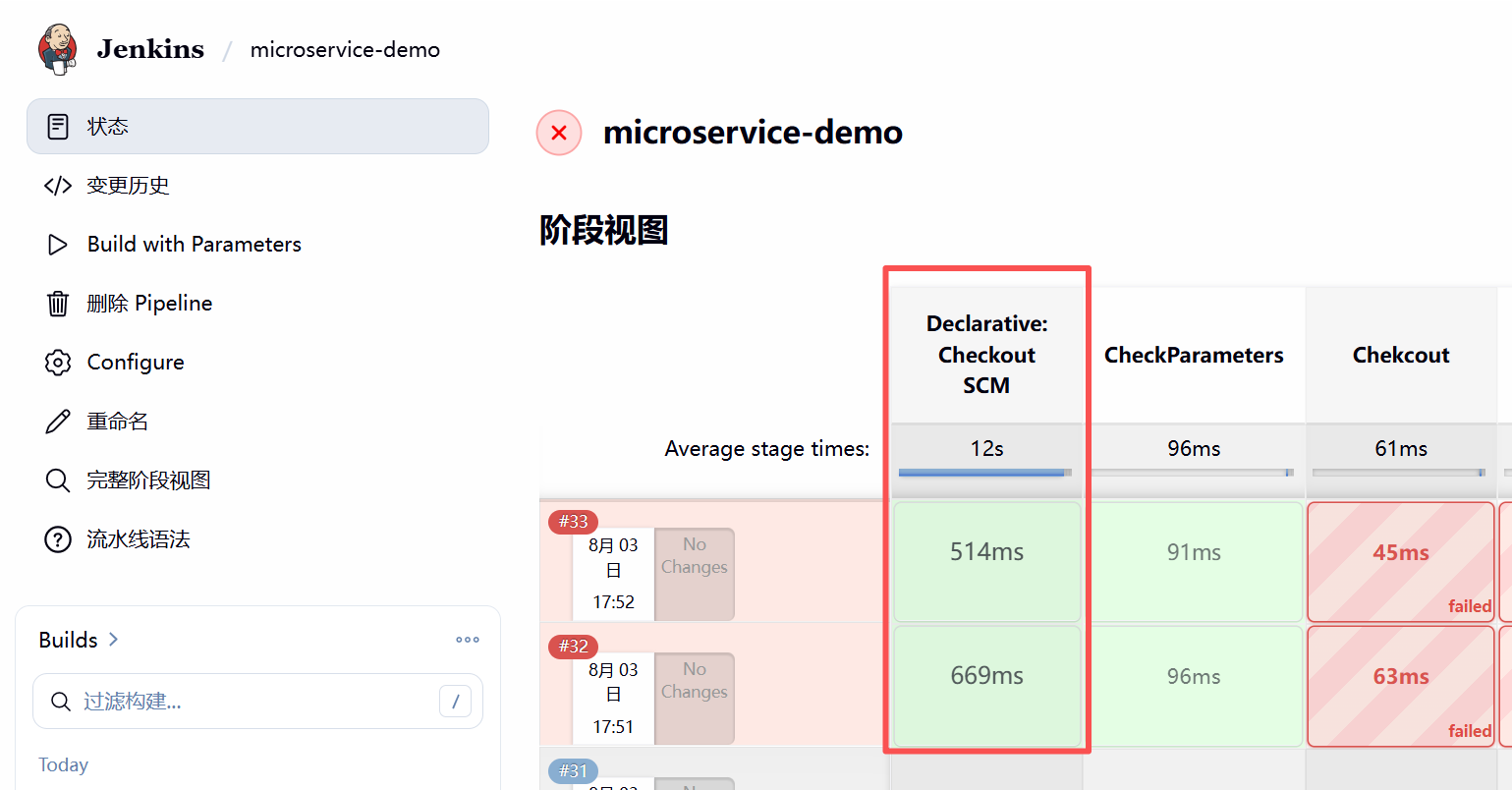
耗时来到了毫秒级别,这才是正常情况。
总结
本次问题的根因并非 GitLab、Jenkins、SSH 或网络性能,而是 Linux 主机名(FQDN)无法正确解析。
当 Git/SSH 建立连接时,会触发 libc 的主机名解析流程。由于主机名 gitlab、builder 无法通过 hosts 或 DNS 正确解析,glibc 根据 search localdomain 自动补全为 gitlab.localdomain、builder.localdomain,并按照 DNS 重试策略连续等待 3 次,每次 5 秒,最终产生约 15 秒固定延迟。
由于 Jenkins Pipeline Script from SCM 每次构建都会执行 Git 拉取,因此该 DNS 超时被直接放大为构建耗时。
正确配置 hostname 与 /etc/hosts 后,Git Clone 耗时从约 15 秒下降至 0.5 秒以内,Jenkins Checkout SCM 阶段也恢复到毫秒级。
以下几个典型现象:
- git clone 固定慢 15 秒
- hostname -f 很慢
- ssh localhost 或 sudo 可能慢 15 秒
- strace 中出现 xxx.localdomain
- poll(..., 5000) 连续出现 3 次
以后再遇到类似的 15 秒、30 秒、60 秒固定延迟问题,第一时间就应该怀疑 主机名解析(hostname/FQDN/DNS),而不是先怀疑 Git、Jenkins 或网络带宽。
补充
最后再补充一个如何正确设置主机名的规范:
- 设置规范的主机名:hostnamectl set-hostname gitlab
- 设置主机名后一定要在 /etc/hosts 中做映射
- 主机名必须能够在本机完成解析,无论是通过 /etc/hosts 还是 DNS 服务器,否则可能导致 hostname -f、sudo、ssh、git 等依赖主机名解析的程序出现明显延迟。
最后再说一嘴,在我的这个案例中,我的Windows主机实际上开启了v2rayN的Tun模式,并且打开了使用系统hosts,这样就对我的整个Windows主机、VMware里所有的虚拟机进行了DNS劫持,也相当于我内部的一个DNS服务器,理论上只要配置正确也是没有问题的,结果就是我windows上的hosts设置也不完整,所以导致了一系列问题,只要在我windows上的hosts设置正确也可以正常工作:
192.168.118.141 gitlab gitlab.chenxie.net
192.168.118.142 builder
但是还是建议按照规范在主机上规范设置。